
The UPSC civil services examination is a test of not just knowledge, but also of retention and recall. With a vast and ever-expanding syllabus, the real challenge for many aspirants is not just learning the material, but remembering it accurately under pressure and revising it. This is where a powerful, free, and open-source tool called Anki can be a game-changer.
My name is Arth Singh. I am a 4th-year undergraduate student at NIT Agartala in the department of Biotechnology. I have more than 30k revisions in Anki and I will touch a 1-year anniversary of Anki in August 2025. I recently gave GATE (2025) in Psychology, and while psychology is not my major subject, I was able to crack it with an AIR of 2527 in a span of 4 months. Here Anki played a huge role and I am currently preparing for UPSC 2026. I will be your guide for today, now let’s begin.
What is Anki?
At its core, Anki is a smart flashcard program. But instead of using physical paper cards, you create digital “cards” with a question on one side and an answer on the other. This could be anything: a historical date, a constitutional article, a key term from economics, a geographical location, or a concept from ethics. You can create these cards on your computer, and then review them on your laptop, smartphone, or tablet.
The Magic Behind Anki: Spaced Repetition
The true power of Anki lies in its algorithm, which is based on the scientifically-proven principle of Spaced Repetition.
So, what is Spaced Repetition?
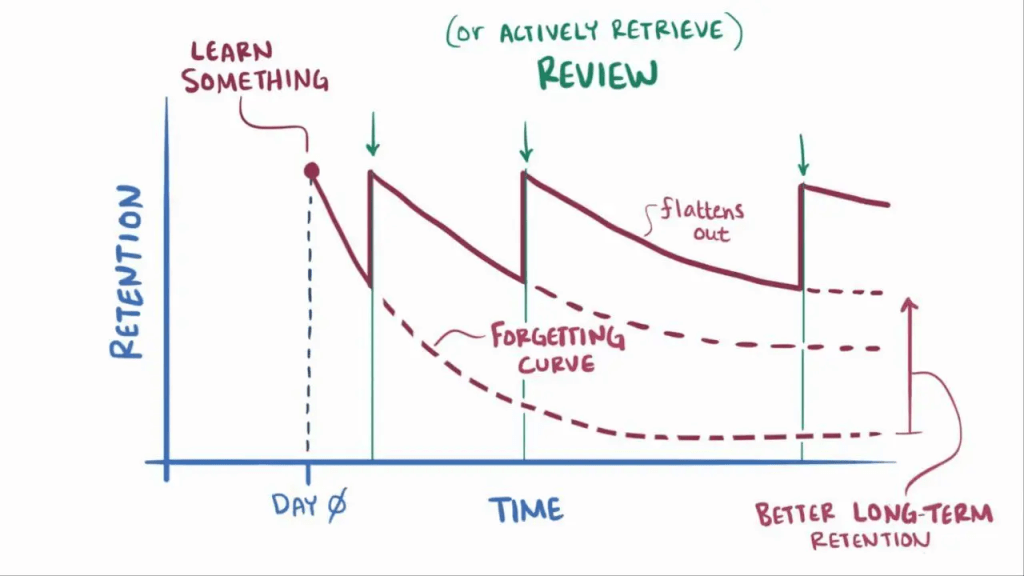
Imagine you learn a new fact today. You might remember it tomorrow, but in a week, it might get hazy. In a month, you might forget it completely. This is the “forgetting curve” in action.
Spaced Repetition interrupts this curve. The system works like this:
- When you first learn a flashcard, Anki will show it to you again relatively soon.
- When you review the card, you tell Anki how well you remembered it (“Again,” “Hard,” “Good,” or “Easy”).
- Based on your feedback, Anki’s algorithm calculates the optimal time to show you that card again.
- If you found it easy, Anki will wait for a longer period before showing it to you again.
- If you found it difficult, it will show you the card more frequently, until it moves into your long-term memory.
This method ensures that you spend your valuable revision time focusing on the information you are most likely to forget, while not wasting time on concepts you have already mastered. It’s a highly efficient and personalized way to move information from your short-term to your long-term memory, ensuring that what you learn, stays learned.
How Can Anki Specifically Help Your UPSC Preparation?
Knowing the theory is one thing, but applying it is what counts. Anki moves you from passive reading to active recall, forcing your brain to retrieve information, which strengthens memory pathways. Here’s how you can leverage it for the UPSC syllabus:
- Mastering the Static Syllabus: The UPSC syllabus is filled with facts that need to be at your fingertips. Anki is perfect for memorizing Polity articles, historical timelines and treaties, national parks and their locations, economic terms, and lists from various reports. Instead of re-reading the same page 20 times, you commit the core facts to Anki once and let the algorithm handle your revision.
- Conquering Current Affairs: Create cards for important facts, names, and concepts from your daily newspaper reading or monthly compilations. For example, a card could ask, “What is the primary objective of the PM-KISAN scheme?” This turns your passive reading into an active and testable knowledge bank.
- Learning from Mock Tests: This is one of the most powerful uses of Anki. After every mock test, don’t just review your mistakes—turn them into flashcards. If you answered a question about a Supreme Court judgment incorrectly, create a card for it. This systematically targets your specific weak areas and ensures you don’t repeat the same mistakes.
- Structuring Mains Answers & Retaining Key Data: A high-scoring Mains answer requires not just knowledge but also excellent structure. Use Anki to go beyond just memorizing facts. Create cards for:
- Standard Introductions: For frequently asked topics (e.g., federalism, judicial activism), have a go-to introduction on a card.
- Key Arguments for the Body: Break down complex topics into key arguments or sub-headings that can form the body of your answer.
- Versatile Conclusions: Memorize a few powerful, forward-looking conclusions that can be adapted to various questions.
- Essential Data & Quotes: A well-placed statistic, committee recommendation, or quote can significantly elevate your answer. Anki ensures these crucial details are at your fingertips when you’re writing under pressure.
By integrating Anki into your daily study routine, you create a personalized, dynamic, and incredibly efficient revision system that adapts to your learning needs, ensuring you are prepared not just to understand the syllabus, but to recall it when it matters most.
Getting Started: How to Download and Access Anki
Before you can start making flashcards, you need to get Anki on your devices. It’s recommended to use the desktop version as your main hub for creating and managing decks, and then sync it with your mobile device for reviewing on the go.
- For Desktops (Windows, Mac, Linux): The main Anki application for computers is completely free. You can download it directly from the official website. This will be the most powerful version, where you’ll do most of your card creation.
- For Android: There is a free, official companion app available on the Google Play Store called AnkiDroid. It syncs seamlessly with the desktop application, allowing you to review your cards anywhere.
- For iOS (iPhone/iPad): The official app on the Apple App Store is called AnkiMobile and it is a paid application. While this may seem like a downside, the revenue from the iOS app sales is the primary source of funding for the development of the entire Anki ecosystem, including the free desktop and Android versions. It is a one-time purchase.
Link to download site : https://apps.ankiweb.net/
Configuring Anki for Optimal Performance: A Step-by-Step Guide
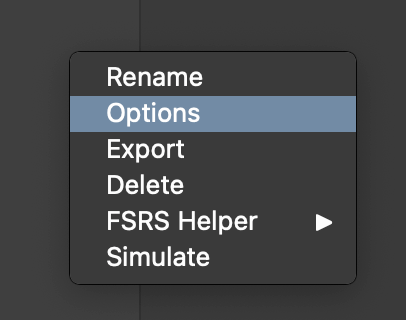
When you first open Anki, the interface and settings are quite basic. To truly unlock its power for the marathon that is UPSC preparation, you need to customize the settings. These changes will make the algorithm work more effectively for you. You can access these settings by clicking the gear icon next to your deck and selecting “Options”.
1. Daily Limits
- New cards/day: This determines how many new cards you see each day. The default is low. Given the vast UPSC syllabus, it’s recommended to set this to a high number like
9999. This doesn’t mean you have to do that many, but it removes the artificial limit, putting you in control of your learning pace. - Maximum reviews/day: Similarly, set this to
9999. You should always aim to clear the reviews Anki presents to you, as this is the core of the spaced repetition system.
2. New Cards
- Learning steps: This setting controls how many times you see a new card before it “graduates” and is scheduled by the main algorithm. A setting like
1mmeans you’ll see it again in 1 minute if you get it wrong. You can add more steps (e.g.,1m 10m) to see it again in 10 minutes, reinforcing it in the initial learning phase. - Insertion order: Set this to
Sequential (oldest cards first)to ensure you’re learning the cards in the order you created them.
3. Lapses
- Relearning steps: This applies when you forget a “graduated” card. A setting like
30smeans when you mark a review card as “Again”, you’ll see it again in 30 seconds to quickly relearn it. - Leech threshold: This automatically tags and/or suspends cards you forget too often (e.g., after
5lapses). This is useful because it flags difficult concepts that you may need to revisit and understand better outside of Anki.
4. FSRS (Free Spaced Repetition Scheduler) This is a newer, more advanced scheduling algorithm in Anki that is highly recommended.
- Enable FSRS: Make sure this option is turned on.
- Desired retention: This is a key setting. It tells the algorithm the probability of recall you’re aiming for. A setting of
90%is a good balance. If you set it higher, you’ll see cards more often. Lower, and you’ll see them less often. - Optimize All Presets: After you have used Anki for a while (a few hundred reviews), you should click the “Optimize All Presets” button. This will analyze your personal review history and fine-tune the FSRS parameters specifically for how your brain learns and forgets, making the scheduling incredibly accurate and efficient. ( I generally don’t touch this , the author of FSRS had said that the algorithm will work fine even without changing the optimization)
If you want to know more about FSRS read this : https://github.com/open-spaced-repetition/fsrs4anki/blob/main/docs/tutorial.md
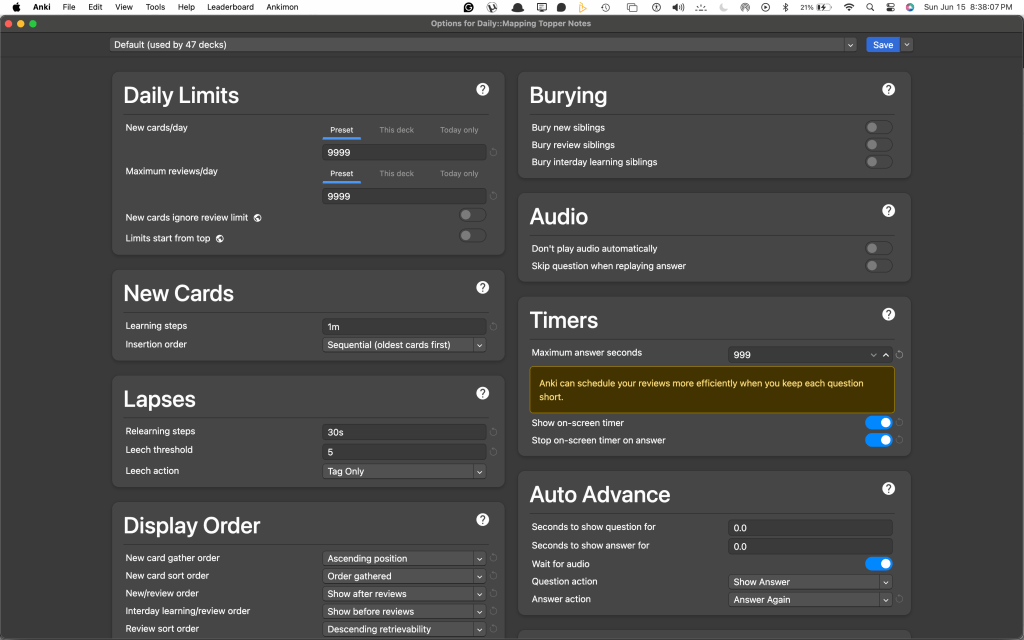

These are my current settings. You can replicate them up until you get to FSRS. For FSRS, I started with 96%. When preparing for a recent competitive exam in just 3 months, I pushed the FSRS to 98%. People generally don’t increase it above 95%; to be very honest, they either don’t want to increase their load or are scared of so many cards. But I found this to be doable. It varies depending on the person. However, I wouldn’t recommend it if it’s reduced below 90%. Your decision also depends on how far away your exam is.
Unlocking Anki’s Full Potential with Add-ons
Here is where the real beautification and customization begins. Add-ons are small plugins created by the Anki community that can change everything from Anki’s appearance to its core functionality.
How to Install an Add-on
- In the Anki desktop application, go to the menu bar and click Tools > Add-ons.
- A new window will open. In the top right corner, click Get Add-ons…
- You will be prompted to enter a code. This is the unique ID for the add-on you want to install.
- Paste the code and click OK.
- After the add-on downloads, you must restart Anki for the changes to take effect.
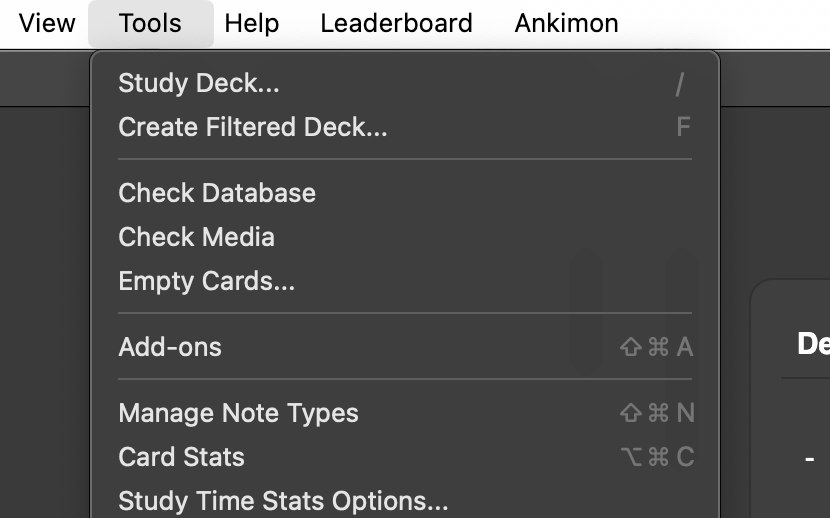
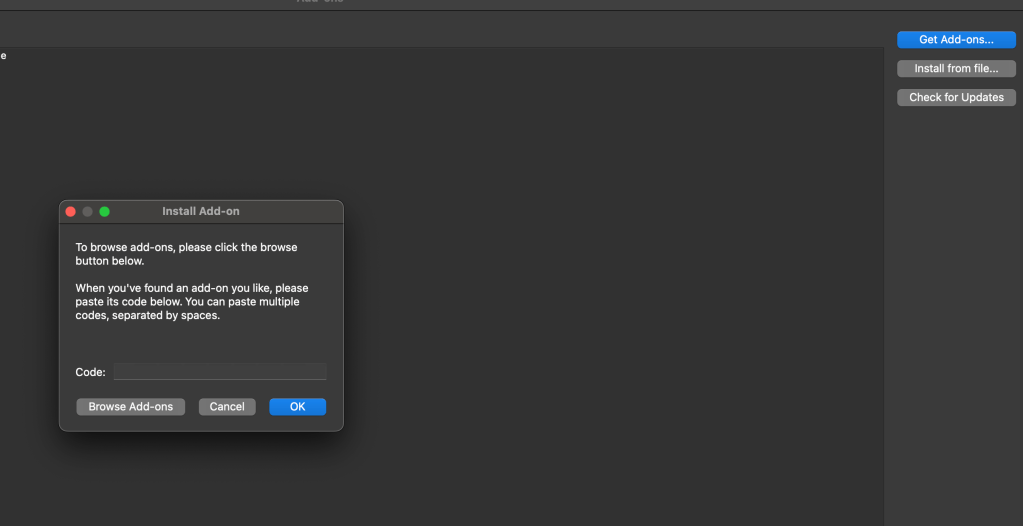
Get Add ons > browse add-ons (if u dont have the code explore the website)>copy the code and paste it >Ok
This is plugins/add-ons website : https://ankiweb.net/shared/addons?search=
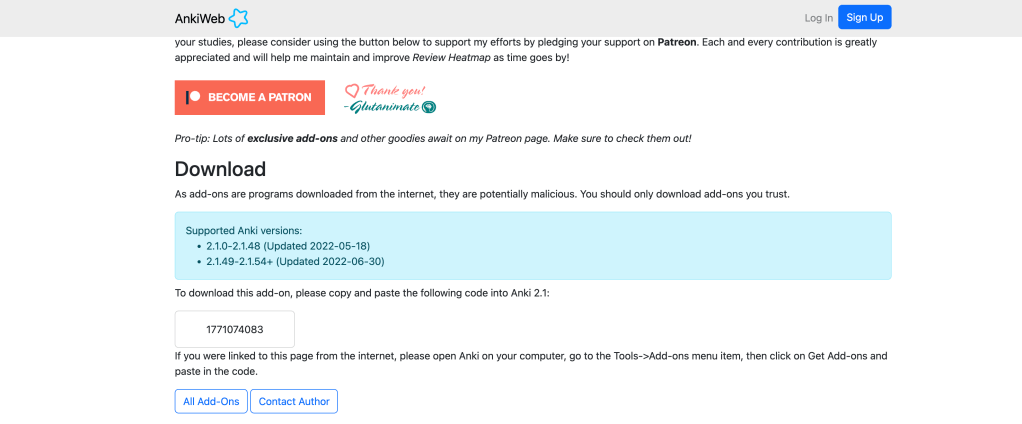
Click on the add-on you want , scroll down you will see a box just below download , this is the code that you have to copy and paste.
Restart Anki for plugins to be applied.
Essential Backend Add-ons
Before you get into heavy visual customization, here are a few necessary add-ons that improve the user experience.
- Pass/Fail (Also known as “2-Button” or “Simple Answer Buttons”):
- Code:
876946123 - Function: This is a crucial add-on that simplifies the review process. Instead of the default four buttons (“Again”, “Hard”, “Good”, “Easy”), it gives you only two: a “Fail” button and a “Pass” button. This removes decision fatigue and makes your reviews faster. You either know it or you don’t.
- Code:
- Colorful Confirmation:
- Code:
1084228676 - Function: Provides simple, colored visual feedback when you click an answer button, confirming your choice. It’s a small but satisfying UI improvement.
- Code:
- Review Heatmap:
- Code:
1771074083 - Function: This add-on adds a calendar-style graph to your main Anki screen, showing your review activity. It’s a powerful motivator that encourages you to maintain your study streak and provides a clear visual record of your hard work and consistency.
- Code:
I strongly recommend you explore the official Anki add-ons website for more plugins. You can find add-ons for image occlusion, better tagging, custom fonts, and much more to tailor Anki to your exact needs. The ones mentioned above, especially the Pass/Fail button, are essential for an efficient workflow.
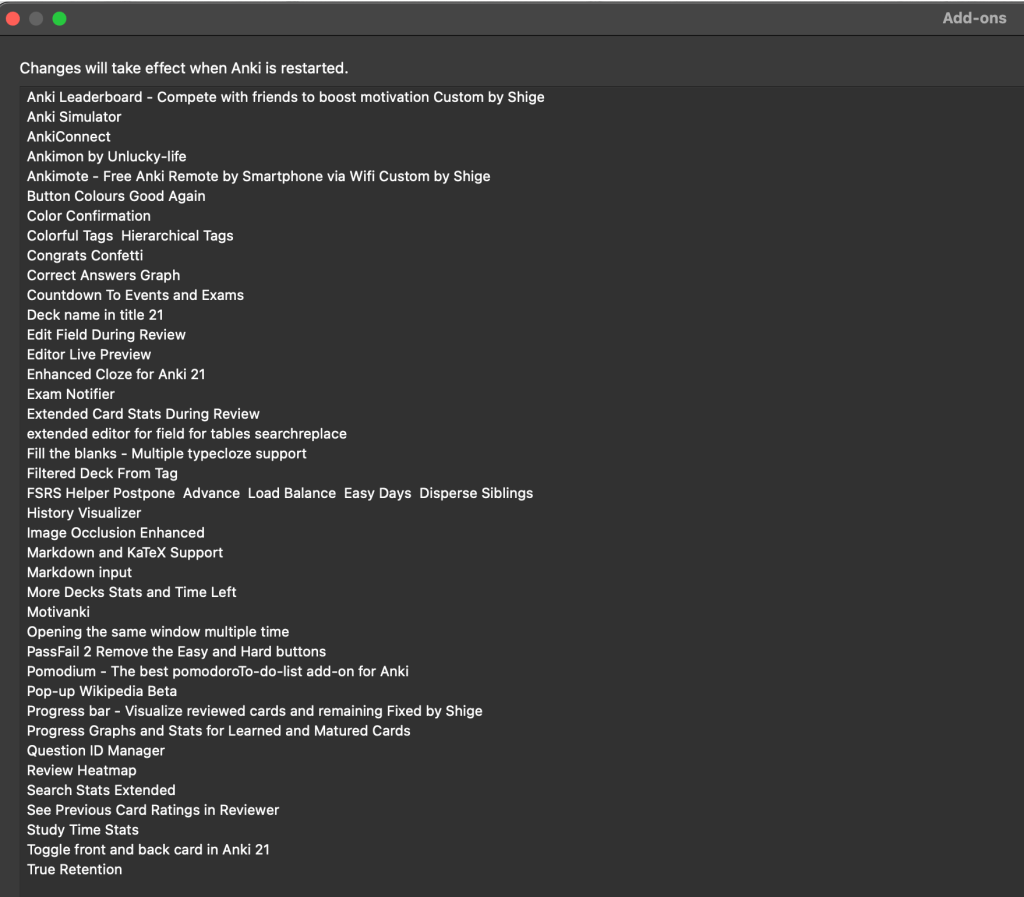
Below I have shared my list of add-ons. These are mostly statistics and data analysis add-ons. I generally love to work with these. You can download them by searching them on addons website.
Main Deal : Anki’s Note Types: Basic, Cloze, and Image Occlusion
Anki’s power is amplified by its different “note types,” which allow you to create flashcards in various formats. For UPSC, you’ll primarily use three types.
1. Basic (and Reversed Card)
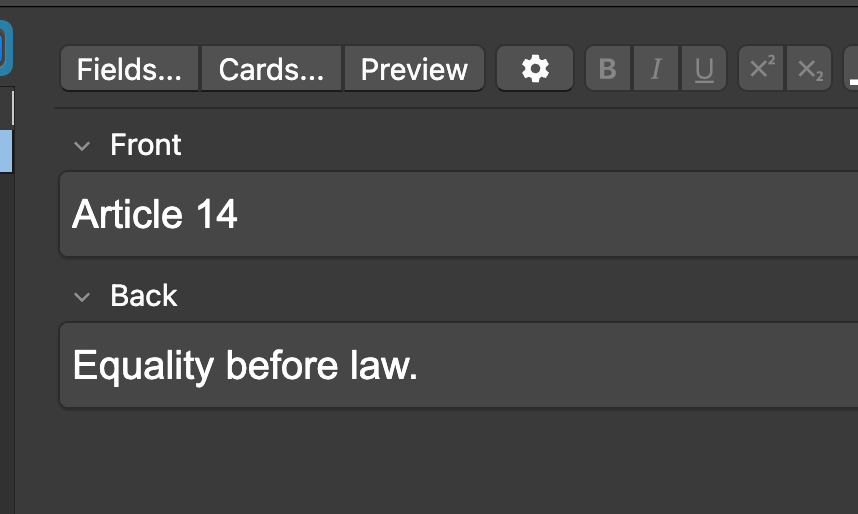
This is the classic front-and-back flashcard. It’s perfect for simple question-and-answer pairs
- UPSC Context Example:
- Front: Which article of the Constitution deals with the right to equality?
- Back: Article 14
2. Cloze Deletion
This note type is for creating “fill-in-the-blank” cards. It’s incredibly effective for memorizing definitions, specific parts of a sentence, or lists. You create a cloze by highlighting text in the editor and clicking the [...] button or pressing Ctrl+Shift+C (or Cmd+Shift+C on Mac). This wraps the text in a special format: {{c1::your text}}.
- UPSC Context Example:
- Card Text: The
{{c1::Swaraj Party}}was formed in{{c2::1923}}by{{c3::CR Das}}and{{c4::Motilal Nehru}}. - What Anki Does: This single note will automatically create four different flashcards, testing you on each blank separately. This is far more efficient than creating four separate basic cards.
- Card Text: The
3. Image Occlusion
This is a game-changer for visual information, especially for subjects like Geography, Art & Culture, and Science & Tech. It requires a special add-on which you can download using its code from the add-on website. Once installed, it allows you to take any image (like a map, diagram, or chart) and draw boxes over the labels you want to memorize. Anki then creates flashcards that show the image with one box hidden, asking you to recall what’s underneath.
- UPSC Context Example:
- You find a map of India showing all the major rivers.
- You use the Image Occlusion tool to draw a rectangle over the names “Ganga,” “Yamuna,” “Godavari,” and “Krishna.”
- Anki will create four cards. Each card will show the map with one river name covered, testing your ability to identify them geographically. This is invaluable for map-based questions in Prelims.

I am supposed to answer the Red Card.
Conclusion: Your Journey with Anki Starts Now
You’ve now seen how Anki can be transformed from a basic application into a highly sophisticated learning partner for your UPSC journey. From understanding the core principles of spaced repetition and active recall to configuring the settings, installing powerful add-ons, and creating effective notes, you have the foundational knowledge to make this tool work for you.
Remember, Anki is not a magic wand. Its effectiveness is a direct result of the effort and, most importantly, the consistency you put into it. Start small, make it a daily habit, and trust the process. The compounding effect of reviewing a little bit every day is immense.
The path to clearing the UPSC exam is a marathon, not a sprint. By integrating Anki into your preparation, you are giving yourself a significant advantage—the ability to learn efficiently, retain information for the long term, and walk into the examination hall with confidence. Good luck!
Reference :
Watch this video ; He introduced me to Anki.
Another video that touches upon the fundamentals nicely :
 UPSC New Methods
Glad to see some innovative ideas shared by fellow aspirants. This is rare currently given our scarcity mindset (in contrast with economically richer countries people who are raised in an abundance mindset). Cheers!
LikeLike